
01
Clients & leads
Catch referrals, WhatsApp pings, and call follow-ups in Discover before the brief goes cold.
One place to run your business.
Unimatix is built for freelance creatives and small studios in India who already run briefs, revisions, and approvals in WhatsApp. Find the work, send the proposal, classify the chat, and invoice from one workspace — without asking the client to learn another app.
What is Unimatix?
Unimatix joins the WhatsApp group you already use with a client and sorts each message into a new task, feedback, approval, milestone, or general chat. That classified work feeds Discover, Proposals, Planner, invoices, and a Client Portal — so the conversation and the record stay the same.
No new app for the client to install or log into for day-to-day feedback
INR proposals and GST-ready invoices, not a dollar-first template
One connected job from first brief to final approval
The Unimatix workspace
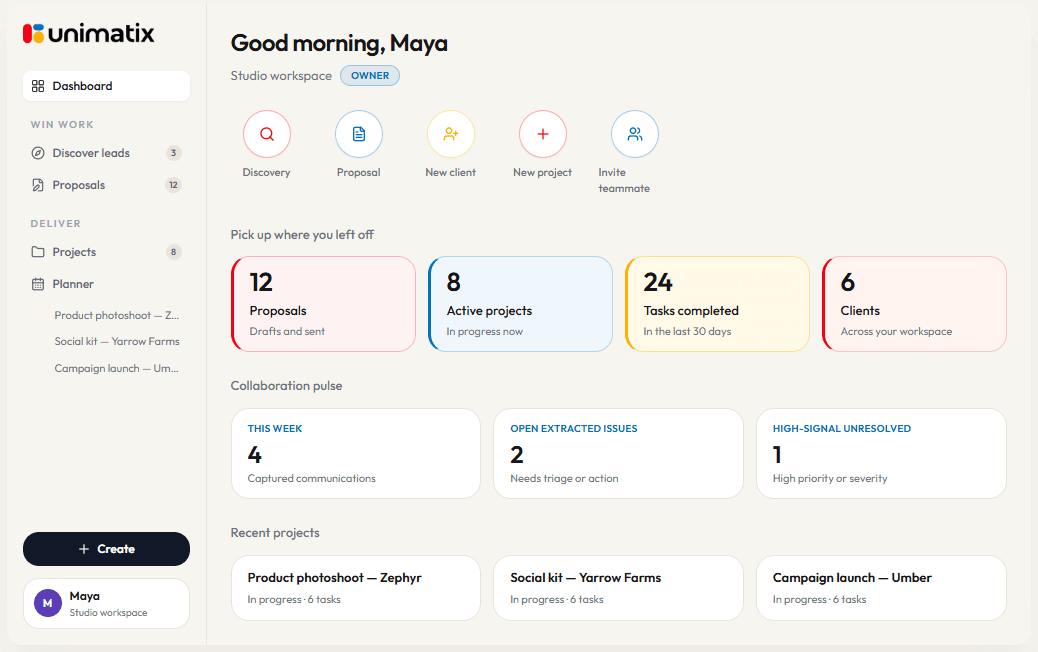
Leads, scoped work, the live client thread, and money sit in one flow. You stop reconstructing the job from chat screenshots, Notes, and a spreadsheet.
01
Catch referrals, WhatsApp pings, and call follow-ups in Discover before the brief goes cold.
02
Planner holds the week. Incoming WhatsApp messages become tasks, feedback, and approvals.
03
Send an INR, GST-aware proposal. Invoice from the trail of what was actually requested.
04
A branded Client Portal mirrors status and files for anyone who wants more than the group chat.
01
Find and qualify new client work before it hits your inbox. Surface leads and briefs in one place instead of scattered across chats and emails.
Today's feed
02
Turn a scoped conversation into a sendable proposal in minutes — priced in INR, ready for approval.
Brand refresh
Discovery, concepts, revisions, and final handoff
03
Every project lives here, from kickoff to delivery. See timelines, ownership, and status in one view.
04
Give clients a clean, branded view of progress and approvals, so status updates stop living in your inbox.
Milestones
3 of 5 complete
Latest feedback
“Love direction B — can we try a warmer palette?”
Why studios switch
You do not need a 40-person sprint board. You need the lead, the signed scope, the WhatsApp thread, and the invoice to stay attached.
01
Lead monitoring
Every enquiry — referral, DM, or call — lands in Discover with the brief and budget still attached.
02
Project control
A signed proposal opens the project. Revisions and extra rounds stay on the same job, not in a side chat.
03
Real-time tracker
Approvals, feedback, and Friday deadlines show up in Planner the morning they arrive — not when you scroll back.
Project status
Riverstone · SS drop
In progress
Pending approval
Completed
The thing no other tool does
Most project tools only work if both sides adopt a board. Unimatix reads the group you already run and labels each message so briefs, notes, and “looks good” stop disappearing.
NEW_TASK
“Can you also design the carousel for Friday?”
FEEDBACK
“Make the headline bolder and lift the logo.”
APPROVAL
“Looks good — proceed to final files.”
Who it is for
Free tools
Templates, group setup, and ghosting follow-ups — then invoices and rates. Each tool is free. Unlock the result with your email.
How the week actually runs
Graphic studio
Revision notes stay on the deliverable. A named approval is the gate before you export — not a sticker from last Tuesday.
Freelance designer
The client never leaves WhatsApp. You still have a proposal, a calendar, and an invoice that matches the extra carousel they asked for.
Agency producer
One client group. Internally, account lead owns approvals; makers pick up feedback. Nobody has to @mention the right person for work to get filed.